Field Notes / Comparison
Comparing local and public inquiry forms
The first version helped someone save the thought. The public form needed somewhere dependable for that thought to go.
Local prototype and canonical public form compared · production round trip later verified separately
The first version could help someone get their thoughts down. The public version needed somewhere dependable for those thoughts to go. That sounds like a small change to a button. It was really a change in responsibility.
Form comparison
Same conversation. Different destination.
These are blank captures of two real implementations. The earlier prototype saved a draft in the browser. The canonical public form is designed to return a retained reference only after server acceptance.
Same conversation. Different destination.
A fresh empty-state capture of the retained local prototype. Browser storage was cleared first; no inquiry was sent.
Open full-size desktop capture (584 × 570)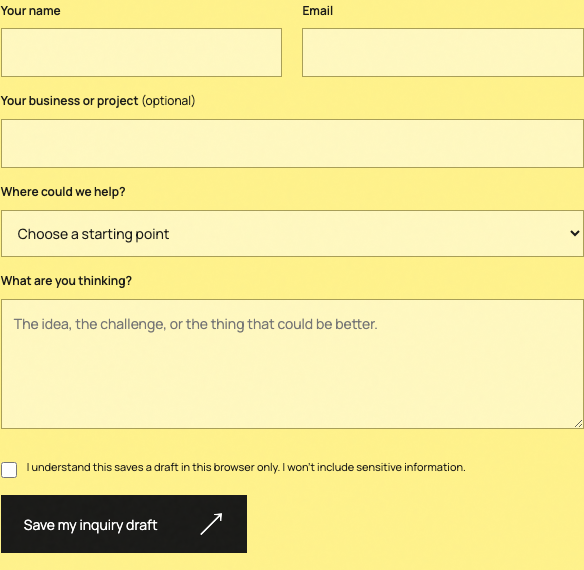
Three things to notice
- The questionLocal draft
“What are you thinking?” made room for an early idea.
Public form“What should your website help people do?” asks for the job more directly.
- The actionLocal draft
The draft tools could save, restore, download, or delete a browser copy.
Public form“Send the inquiry” starts a server-validated acceptance path.
- The evidenceLocal draft
Recorded checks found zero outbound form requests.
Public formAcceptance requires accepted: true plus a retained reference. It was not exercised in this comparison; a later QA/internal round trip verified it separately.
The process, in four moves
- DraftBuild a private form that saves the idea on one device.
- CheckVerify validation, restore, download, deletion, focus, and zero outbound requests.
- ConnectAdd server validation, durable acceptance, deduplication, and a retained reference.
- GateRequire accepted: true in the interface and keep production submission outside journal QA.
The first form saved the thought
The Living Folio prototype was private and local. Its inquiry form validated the visible fields, saved a draft in browser storage only after someone chose to save it, restored that draft after a reload, offered a text download, and could delete the browser copy. The interface said exactly what it did: nothing had been sent.
That was the right contract for a prototype. We could review the writing, sequence, phone layout, error states, focus behavior, and the feeling of the interaction without pretending a receiving service already existed. The recorded browser checks covered desktop and phone widths, local save and restore, download and deletion, and zero outbound form requests.
The public form changed the promise
A public form has to do more than collect the same-looking boxes. The canonical implementation asks for a project type, working budget, timing, and the job the website should help people do. The budget choices describe the visitor’s plans, not our prices. The wording narrows the conversation without turning the form into a quote or a contract.
On the receiving side, the handler validates the request, writes the inquiry and its inquiry_submitted event together, and reads back the retained reference before returning accepted: true. Repeating the same submission key returns the stored reference instead of making a duplicate. During this comparison, I caught one gap in the browser contract: the interface had trusted ok without also requiring accepted: true. That check is now explicit, so a decoy response cannot be presented as a saved inquiry.
What stayed familiar
The two forms still belong to the same conversation. Both begin with a name, email, business or project, a starting point, and a plain-language prompt. Both warn against sensitive information. The public form keeps the yellow worktable feeling, but the action changes from keeping a thought on this device to asking the studio to receive it.
That continuity matters. Rebuilding an interaction does not require making it unrecognizable. The useful design change is the one that helps a person understand what will happen next. Here, the button, consent language, supporting fields, and confirmation contract all had to agree.
What this comparison establishes
The four images are fresh blank captures from the retained prototype and the canonical Sites source at desktop and phone widths. Browser storage was cleared before the local captures. Every visible field was empty. The capture run made no non-GET form request and produced no page error. The public capture used the internal-review suppression path and did not submit the production form.
The comparison establishes an interface change and an implementation boundary. It does not establish that the public form delivered a lead, that an inquiry was qualified, that anyone signed work, or that conversion improved. At the time of these captures, only a disposable-database test had exercised the acceptance contract. Later on September 29, cycle 013 sent one immutable QA/internal request through production, retrieved the retained reference, repeated the same key without creating a duplicate, and kept the record outside public business totals. That later check proved the route, not demand.
| Question | Local prototype | Canonical public form |
|---|---|---|
| Primary action | Save my inquiry draft | Send the inquiry |
| Destination | Browser storage on that device | Server acceptance path |
| Context | Starting point and open message | Project type, budget, timing, and website job |
| Receipt | Local saved-state message | Retained reference after accepted: true |
| What is proven here | Recorded local behavior and fresh blank captures | Implementation contract and interface; not a production submission |
Keep this part
The button should name the responsibility behind it. A draft can stay here. An inquiry needs a real receipt.
The interface starts the story. The receipt decides what actually happened.
Read how inquiry evidence is definedRecorded checks, with the limits attached
- All four captures use empty fields from isolated browser state; no names, email addresses, messages, or inquiry records appear.
- The retained local prototype made zero outbound form requests during the capture run.
- The canonical browser UI now requires accepted: true and a reference before it presents success.
- No production form submission was made for this note. A later, separately tagged QA/internal round trip verified storage and retry deduplication without becoming a lead or business result.
- No lead, qualification, signed work, revenue, conversion lift, ranking, or causal outcome is claimed.
What this note is based on
Based on the retained Living Folio prototype source and browser receipt, the canonical Sites inquiry component and handler, the public privacy notice, the September 29 release records, and the later cycle 013 production QA receipt. The screenshots show actual blank interfaces; they are not inquiry evidence.
Further reading: Small-business web design · Inquiry and measurement privacy
Our results page explains the same evidence standard. For the studio’s approach, return to the MORI MORI MORI home page.